
Learn analytics
Understand AI and crawler visibility
Read AI answer, indexing and training crawler charts without confusing requests with visitors, citations or ranking.
What it is
AI and crawler visibility reports verified server-observed requests from supported answer agents, indexing crawlers and training crawlers. The report shows request totals, trends, crawler families and retrieved pages while keeping crawler activity separate from human website analytics.
Why use it
Use these charts to understand which automated agents requested the site, when request volume changed and which pages they retrieved. Use the evidence to investigate access and response problems without claiming that a page was indexed, cited, ranked or used for model training.
Before you start
- Select the intended site and reporting period. Crawler totals and time buckets use the same site, timezone and date-range context shown on the dashboard.
- Treat every value as a verified crawler request count. A request is not a human visit, generated answer, citation, ranking signal or confirmation of how retrieved content was used.
- Google Search Console is not required for this report. Premely populates it automatically when supported server-observed crawler events arrive.
How to use it
- 1
Read the AI Answers chart
Scroll to the
AI Answers,IndexingandTrainingcard near the bottom of the dashboard. ChooseAI Answersto compare supported answer agents. Read each agent's total and line over time, but do not treat a request as proof that the provider generated an answer or cited your site.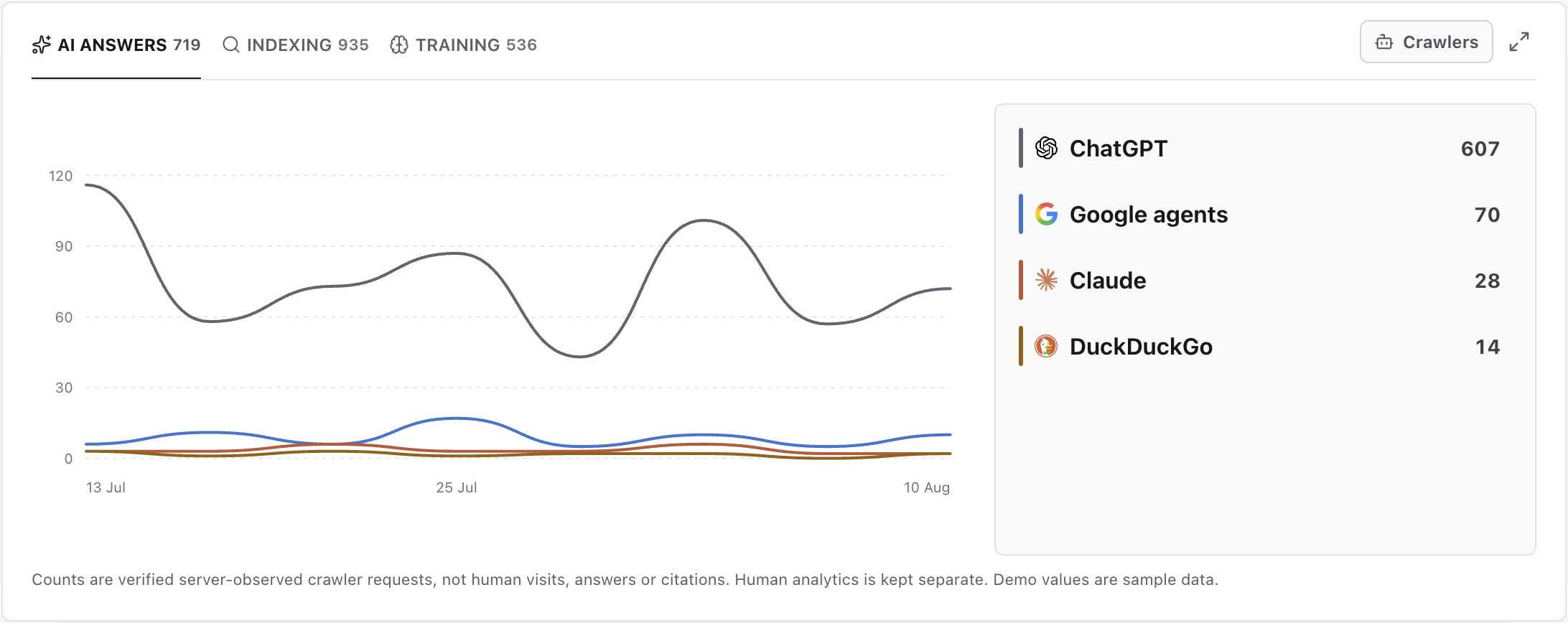
Use AI Answers to compare verified answer-agent requests without treating a request as a generated answer, citation or human visit. Captured from the real light-mode dashboard with labelled demo values; your verified crawler counts and pages will differ.
- 2
Review indexing crawler activity
Choose
Indexingto compare requests from supported indexing crawlers such as Googlebot, Bingbot, Applebot and DuckDuckBot. Retrieval confirms that Premely observed the request; it does not prove that the requested page entered an index, remained indexed or gained a ranking.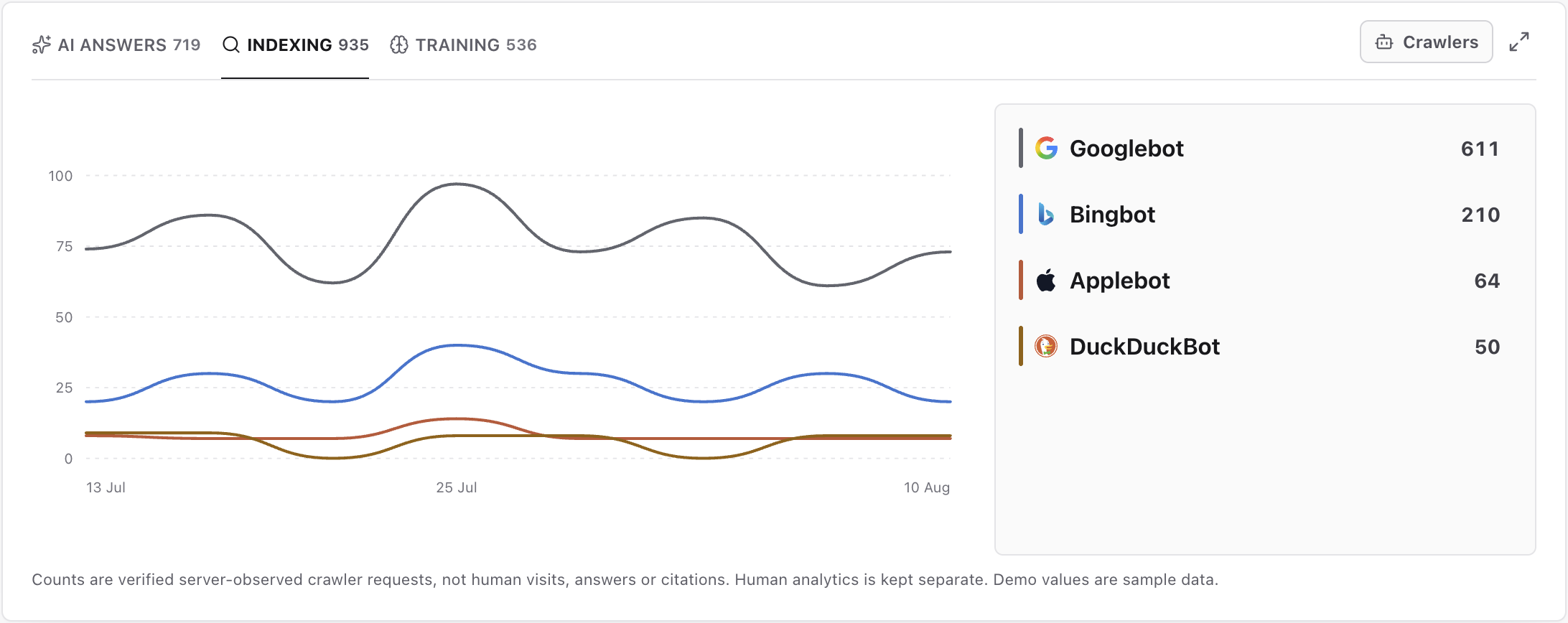
Use Indexing to see which verified indexing crawlers requested the site; retrieval does not confirm that a page was indexed or ranked. Captured from the real light-mode dashboard with labelled demo values; your verified crawler counts and pages will differ.
- 3
Review training crawler activity
Choose
Trainingto compare requests from supported training crawlers such as GPTBot, ClaudeBot and CCBot. Premely reports the request it observed and does not infer whether a provider retained the response or used it in a model-training process.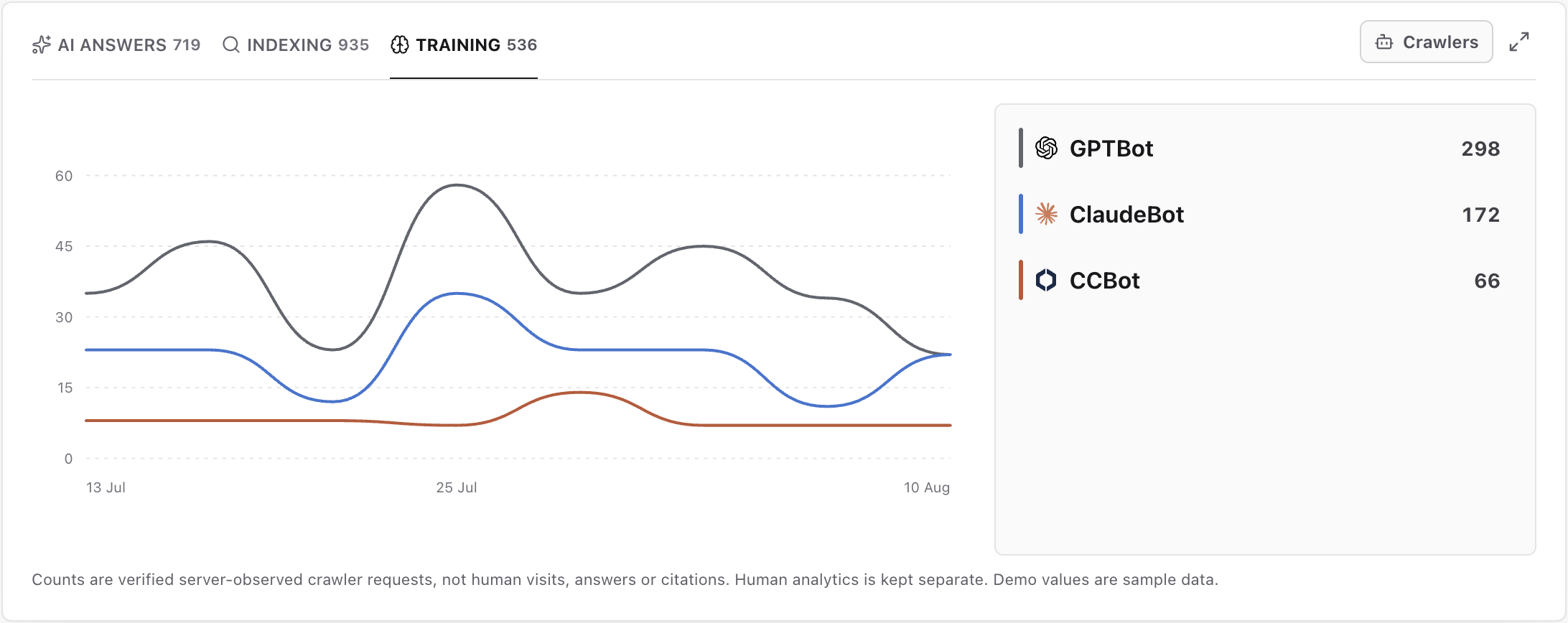
Use Training to review verified training-crawler requests without inferring how a provider stored or used the retrieved content. Captured from the real light-mode dashboard with labelled demo values; your verified crawler counts and pages will differ.
- 4
Switch between crawlers and pages
Choose
Indexing, then click theCrawlersbutton at the top right of the card. It changes toPages, and the lines and rows show retrieved paths. ClickPagesagain when you want to return to crawler grouping.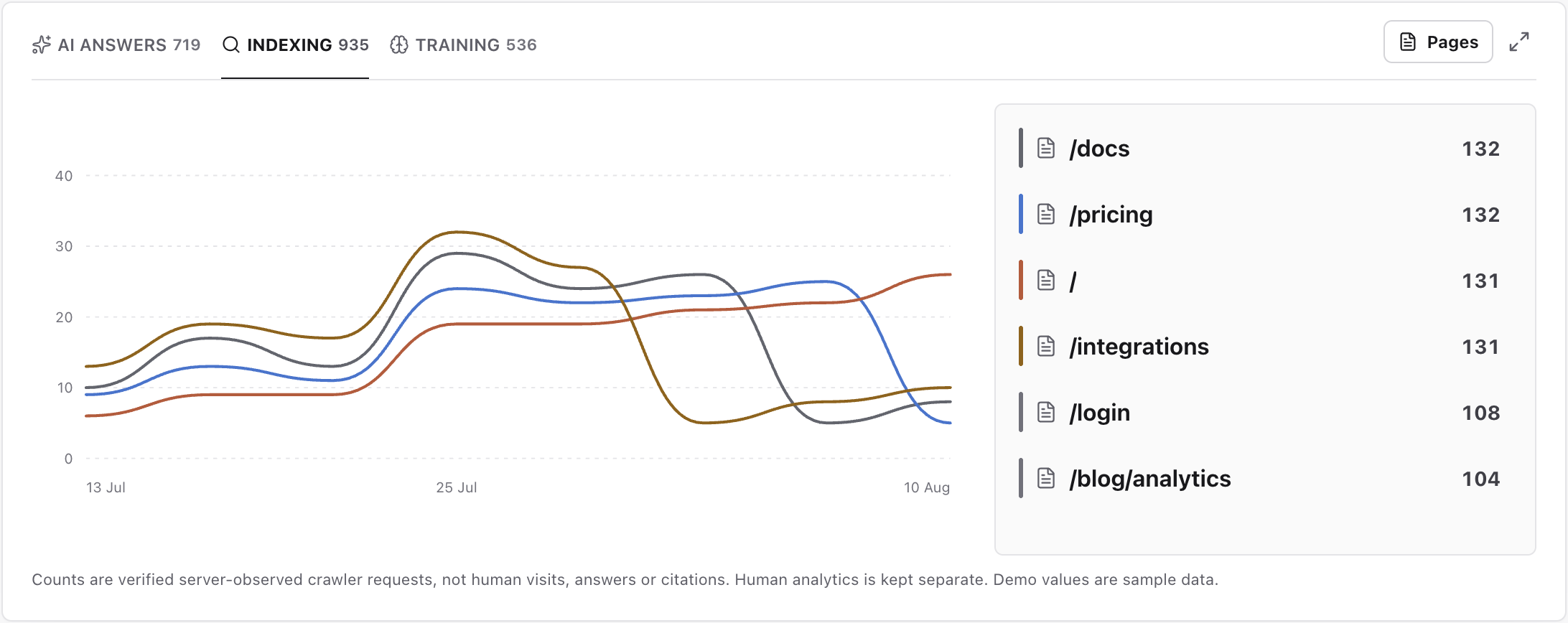
Switch the chart to Pages to find frequently retrieved paths, then open a row to inspect the crawler breakdown and any displayed response-status problem. Captured from the real light-mode dashboard with labelled demo values; your verified crawler counts and pages will differ.
- 5
Open a page's crawler breakdown
Click a path in the list beside the chart, such as
/docs. The side panel shows which crawlers requested that page and their request counts. UseFilter crawlersto find one crawler, or the panel'sxto return to the page list.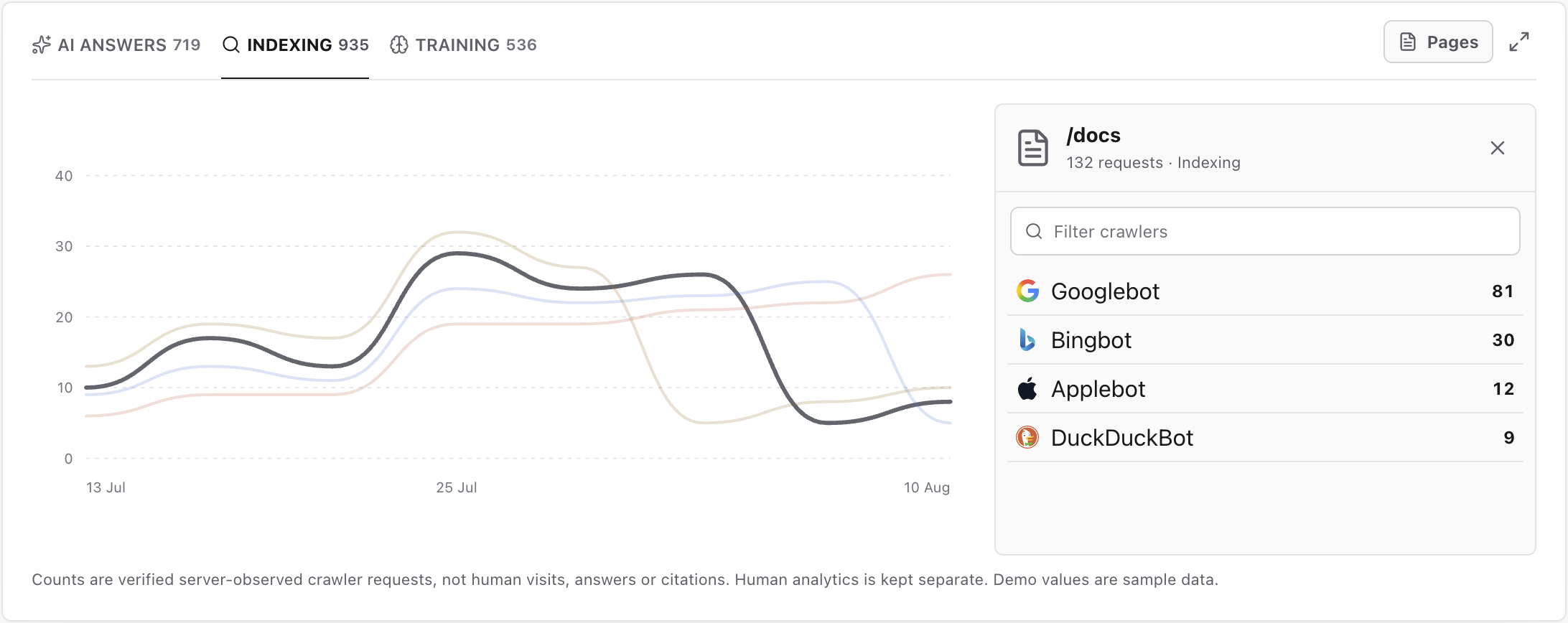
Click a page row to see which crawlers requested it. The side panel includes a crawler search and its own close control. Captured from the real light-mode dashboard with labelled demo values; your verified crawler counts and pages will differ.
- 6
Search the complete crawler table
Click the expand icon at the top right of the card, beside the grouping button. The
Crawlersdialog lists each crawler'sPurposeandRequests. Use the search field beside the title or click a sortable column heading to inspect the list. Close the dialog with itsxwhen finished.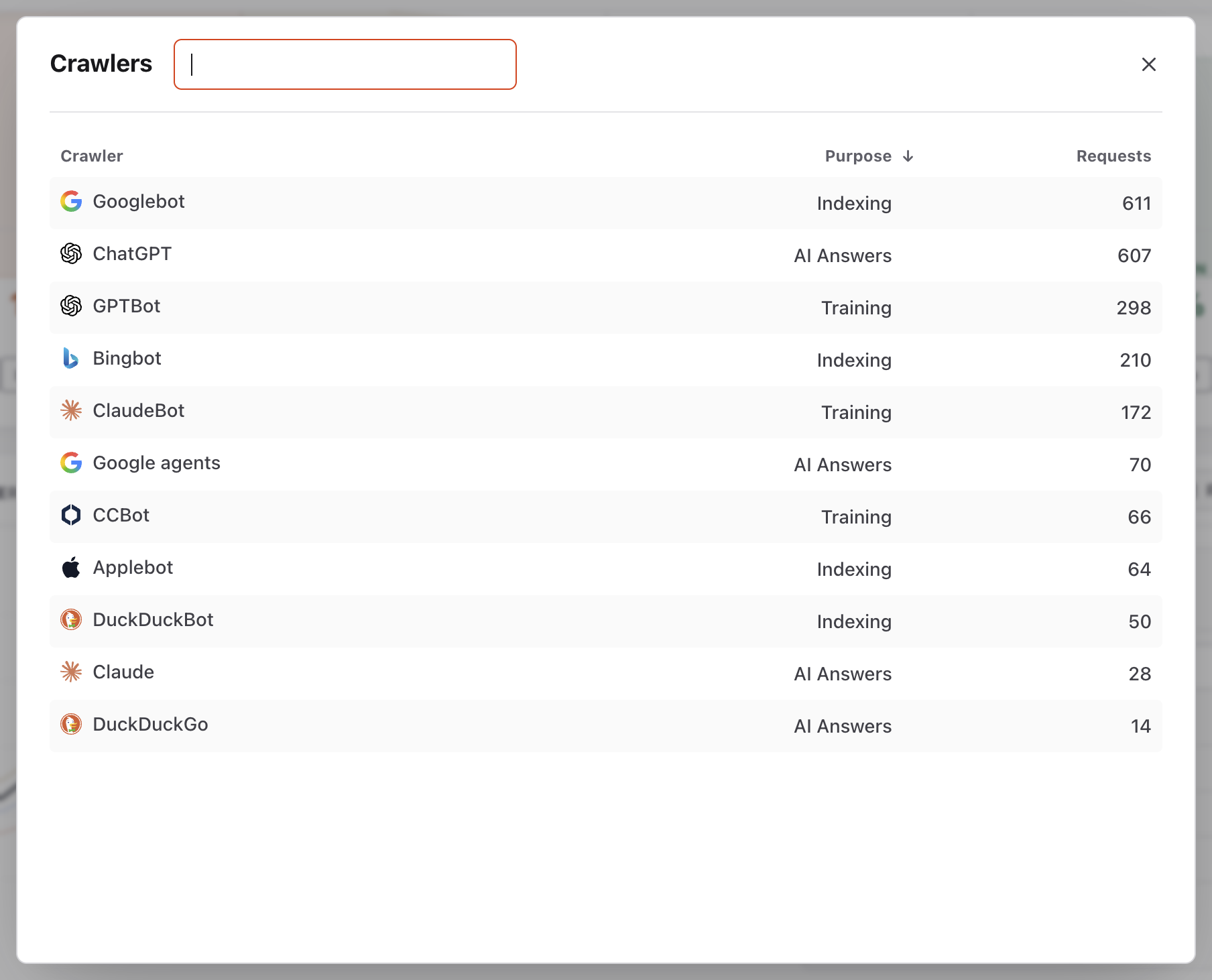
The full table lists crawler names, their purpose and request totals. Use the search field beside Crawlers or the sortable column headings to narrow the list. Captured from the real light-mode interface with disposable demo values; your dates and totals will differ.
- 7
Keep AI referrals in human analytics
Return to the acquisition card and choose
Channels. TheAI Assistantsrow counts human visitors referred by supported assistants. Use Traffic sources to investigate those visits and outcomes; do not combine them with the automated requests in the crawler card.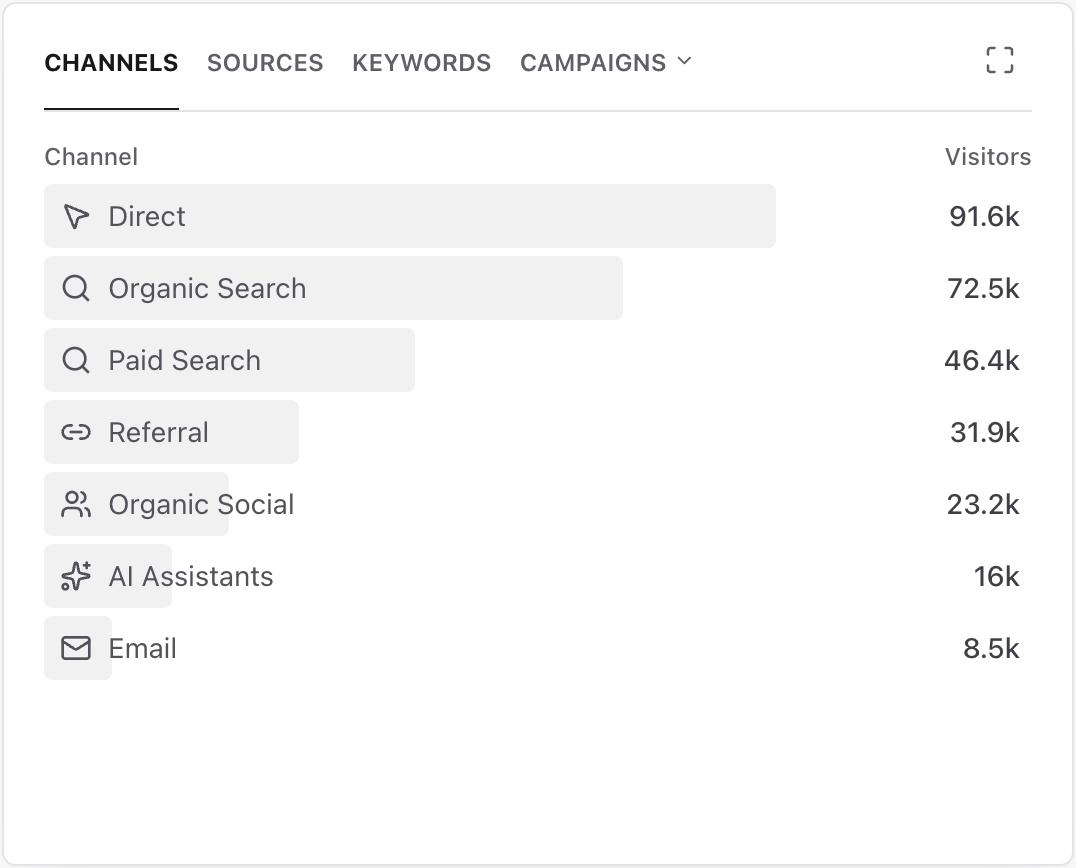
AI Assistants here counts human visitors referred by supported assistants. These are separate from the crawler request totals. Captured from the real light-mode interface with disposable demo values; your dates and totals will differ.
What to expect
Each tab has an independent total
AI Answers, Indexing and Training classify different crawler purposes. Compare trends inside one tab and period rather than adding the tabs together as a measure of audience or visibility quality.
Page grouping shows retrieval, not success
A frequently requested path can be healthy, redirected, missing or blocked. Open its details and check any displayed response status before deciding whether the page needs attention.
Empty and unsupported states stay explicit
No activity means Premely observed no verified requests for that crawler purpose in the selected period. If an active dashboard filter is unsupported, remove or change the filter instead of treating the unavailable chart as zero.
Crawler identity is bounded
Premely classifies supported server-observed crawler identifiers. It does not claim that every automated request can be identified or that a named provider endorses the classification.
Useful ways to apply this
Investigate an indexing change
Compare Indexing across equivalent periods, switch to Pages and inspect the paths whose request volume changed before checking their public response and indexing tools.
Find a repeatedly retrieved error page
Group by Pages, open a path with meaningful request volume and investigate any non-success response status on the real public URL.
Separate AI discovery from AI-referred visits
Use the crawler report for automated retrieval and Acquisition for human AI Assistant referrals, then compare the referred visitors with their measured conversions separately.