
Manage your workspace
Use privacy controls
Review the current site data controls, exclusions and deletion status.
What it is
Privacy controls are the site and workspace settings for how Premely handles the current measurement mode, exports and deletion requests.
Why use it
Use this guide when you need to understand the controls visible in your workspace or when an authorised person needs to review data handling actions.
Before you start
- Premely uses Cookie-free measurement for the selected site.
- Review your own legal, policy and jurisdictional requirements. This guide does not make a compliance or consent determination for your website.
How to use it
- 1
Open privacy controls
Open the Privacy or Data section in Site settings to review the controls that apply to the selected site.
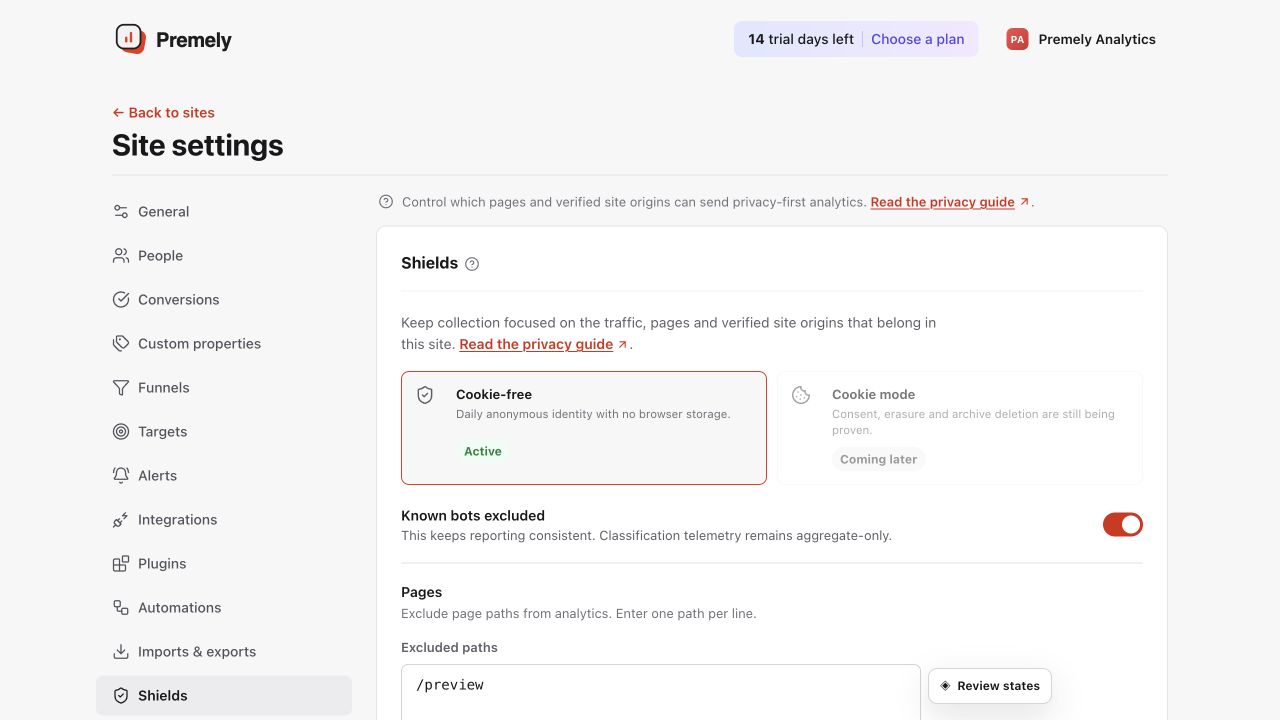
Review the current collection controls and save only the settings that match the site's privacy requirements. Shown in Premely with disposable demo data; your values will differ.
- 2
Review current collection settings
Confirm that the displayed mode and any available exclusion controls match the way the site is intended to be measured.
- 3
Review exports before creating one
Use exports only when the destination is appropriate for the data.
- 4
Follow deletion status
Read the queued, in-progress, blocked or complete status rather than assuming a deletion request has finished.
What to expect
Deletion status is explicit
Do not promise a deletion completion time. The shown status is the current source of truth.
Known-bot handling has limits
Available exclusions use the classifications Premely shows. They are not a guarantee that every unwanted request can be identified.
Useful ways to apply this
A privacy review
Use the visible site controls as part of a review of how the website is configured.
An authorised offboarding request
Use the deletion status to follow the request instead of relying on a separate manual record.