
Plugins
Install Premely on Wix
Connect the Premely Wix app, choose the matching workspace and verify the site.
- Wix

What it is
The Premely Wix app connects analytics to a published Wix domain through the Wix site context.
Why use it
Use the Wix app when your site is built and managed in Wix.
Before you start
- Use a Wix account that can manage the site and a Premely account with access to the matching workspace.
- Make sure the public domain in Wix matches the Premely site you want to connect.
How to use it
- 1
Open Premely Analytics in Wix
Open the Premely Analytics app from the Wix site context and choose Connect.
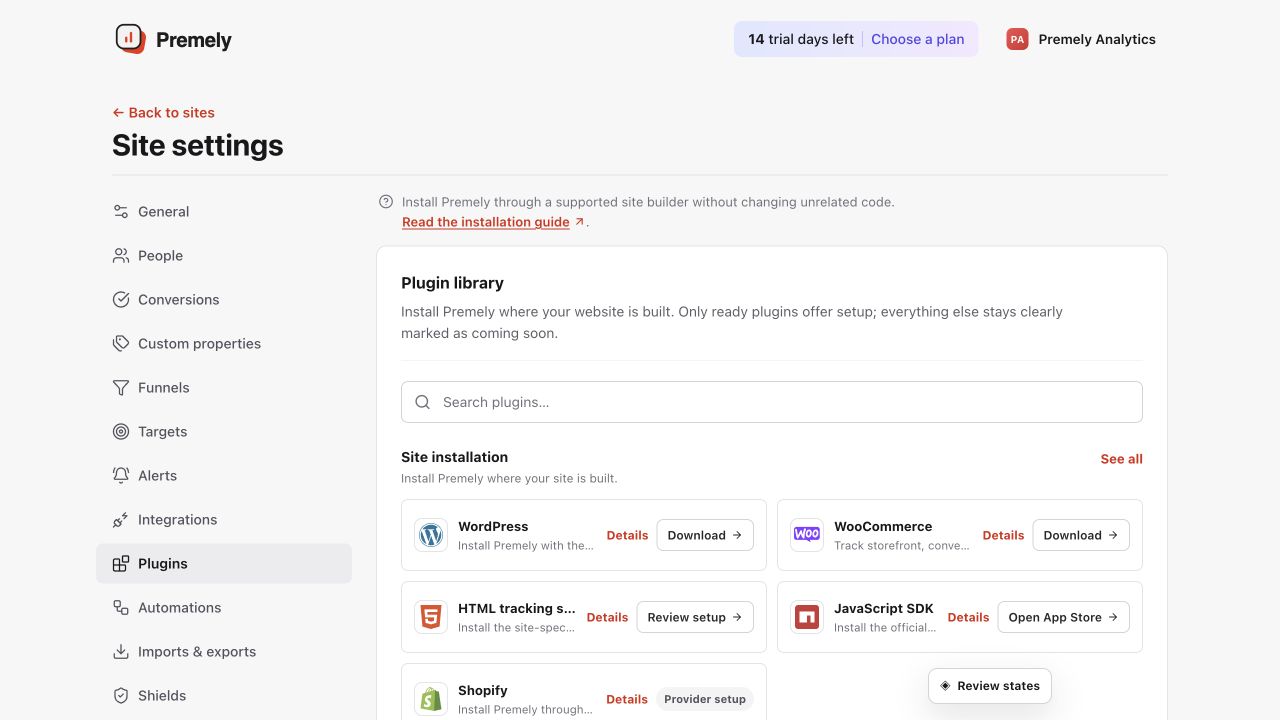
Choose Wix from Plugins to start the guided connection for the selected site. Shown in Premely with disposable demo data; your values will differ.
- 2
Authorize Premely
Sign in to Premely when prompted. Premely confirms your account, workspace role, Wix ownership and published domain.
- 3
Choose the matching workspace
If the domain appears in more than one workspace, choose the exact Premely workspace that should receive the analytics.
- 4
Check the app status
Return to the Wix app and use its status to confirm that the connection is installed and healthy.
What to expect
The published domain is checked
Premely connects only when the Wix published domain matches the selected Premely site.
You can disconnect from Wix
Use the Wix connection controls to remove Premely from the site when it is no longer needed.